 Blog •
22/07/24
One of the things I value most about CLO3D is being able to test design decisions while the garment is still digital. Colour, print, fabric and trim choices can all change how a product reads, but creating a separate file for every option quickly becomes inefficient.
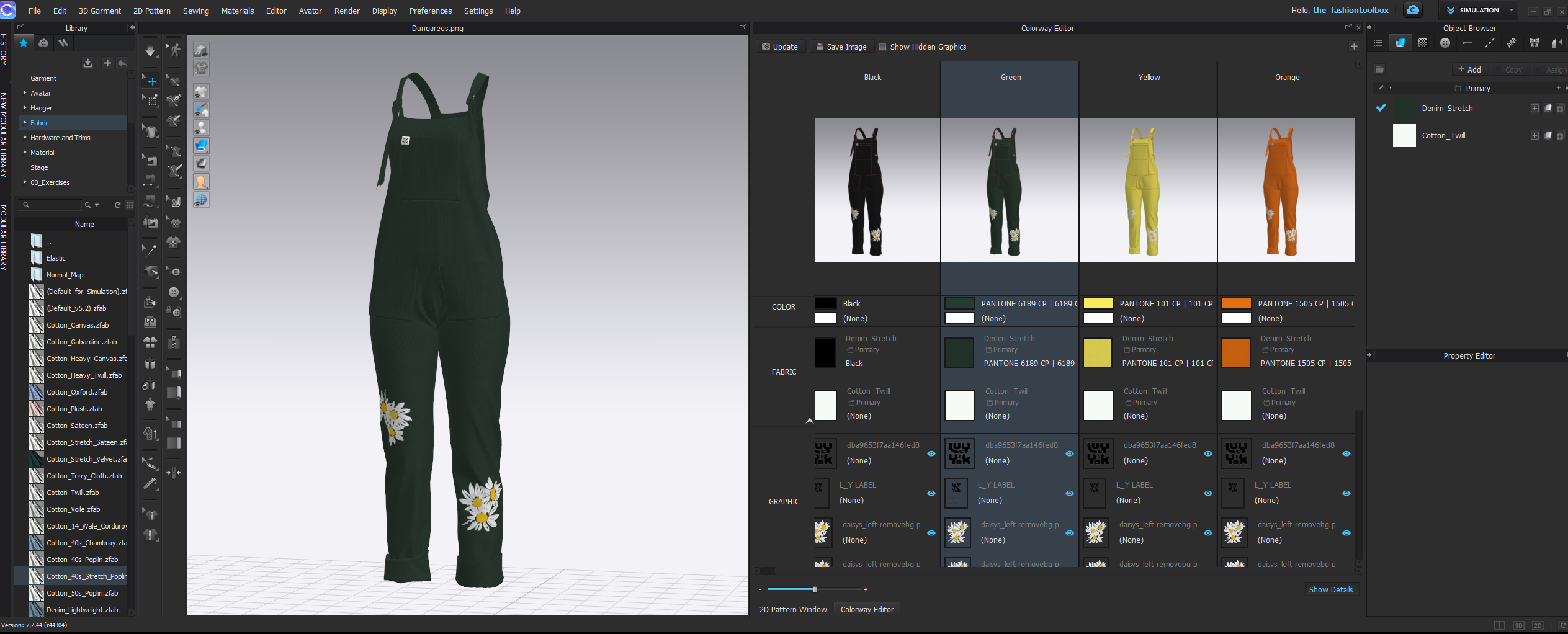
The Colourway Editor gives you a way to manage those variations within the same garment project, making it easier to compare options and communicate different versions of a style.
I use it particularly during design development, when I want to explore combinations quickly without losing the connection to the underlying garment.
The Colourway Editor can be used to create different versions of the same garment by changing material properties such as colour and texture across fabrics, graphics and trims. In current CLO versions, colourways can also be managed with more control over whether items remain linked between versions or use different properties altogether.
For a designer, that makes it useful for comparing colour palettes, print directions, trim combinations and material options without rebuilding the garment each time.
It is particularly useful when several options need to be reviewed together, because each colourway can be saved and viewed within the same project rather than being managed as a collection of separate files.
Working with more complex print or placement graphics? My How to Add Prints & Graphics to Knitwear in CLO3D tutorial shows how I use texture placement, repeat artwork and different graphics across individual pattern pieces
Being able to compare colour, print, fabric and trim options digitally can help teams make more decisions before committing to physical development.
That may reduce the need to sample every visual variation, particularly where the question is about colour or surface appearance rather than fit or construction. But a digital colourway does not remove the need for physical validation where material behaviour, colour accuracy, hand feel or production quality needs to be assessed.
For me, the real value is having another way to narrow down options earlier and communicate those decisions more clearly.
The Colourway Editor is not one of CLO3D’s most complicated tools, but it is one I return to frequently because it supports the part of design development where several options are still in play.
It gives me room to experiment without creating unnecessary versions of the garment file, while still keeping colour, graphics, materials and trims connected to the 3D product.
That combination of flexibility and organisation is what makes it useful in a real design workflow.
Want to see where the Colourway Editor fits into a wider design workflow? I’ve also pulled together 10 CLO3D Tools & Workflows for Fashion Designers, covering StyleLines, graphics, materials, animation and rendering alongside colourway development.
find the Colourway Editor most useful when the garment itself is already established and the next question is about how different colour, print, fabric or trim options change the overall product.
It does not replace physical material review or final production approval, but it can make the earlier stages of option development much faster and easier to communicate.
Like many CLO3D tools, its value comes less from the feature itself and more from knowing when it is useful within the wider development process.


 Go Back